Showing posts with label review. Show all posts

Hello Fresh

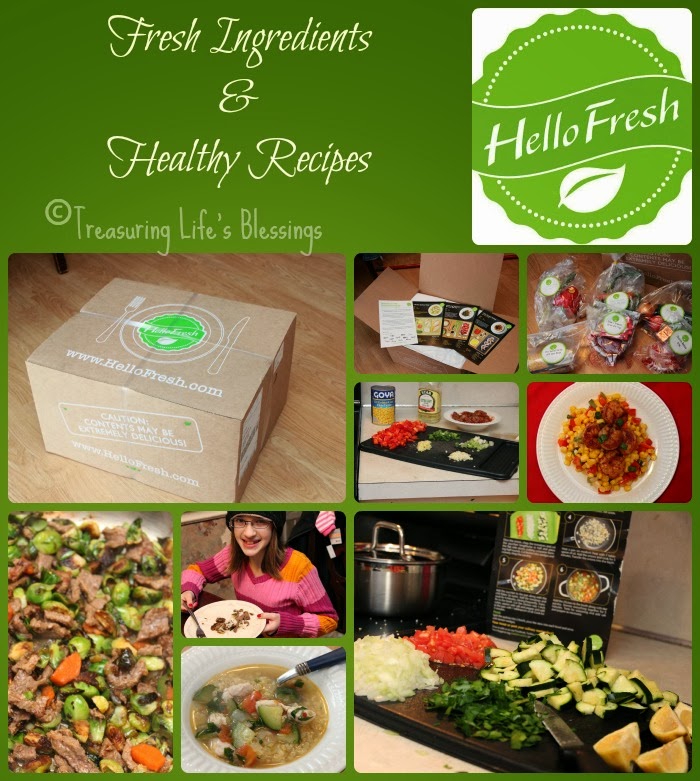
If you've followed here any length of time, you know I absolutely LOVE to cook and am always trying out new receipes! I also have a huge garden during the summer so I appreciate fresh foods and incorporating them into my cooking. You can imagine my delight when I recently got the chance to participate in reviewing a fresh food & recipe delivery service from Hello Fresh.

(click on photos to enlarge)
vegetarian, recipes, food delivery service, fresh food

What is Hello Fresh?

Hello Fresh is a company that sends out boxes of food weekly that contain almost all of the ingredients you need to make 3 mouth-watering meals. They do the work for you of coming up with creative recipes that are good for you & use fresh food, all delivered right to your front door!

How does this work?

First, you want to check out their page to find out if they deliver in your area. If they don't but you have a near by Fed-Ex office that accepts ground shipment, you could have your box delivered there for you to pick up. From there, set up your own account then take a look at the upcoming weeks meal choices and see if it is something you would enjoy. They offer 2 types of boxes, the Classic box & the Veggie box (for those who may prefer  meat-free meals). Select which kind of box you prefer. Then you can choose if you want your box to be for 2 or 4 people. If you selected the Classic box and you see a recipe you don't care for, Hello Fresh offers 2 different meals you can swap them with (not offered for the Veggie box at this time). Your order has to be placed by Wednesday night for delivery for the following Wednesday.

Speaking of delivery, no worries if you aren't home when your box of food is delivered. Those boxes are packed exceptionally well and can stay cold for a long period of time!

A keypoint about this company is just because you ordered a box one week, does not lock you into a certain number of boxes you have to have delivered. If you don't like any of the upcoming recipes for the next week, or you are going on vacation, simply pause the delivery service. You can even cancel at any point with no problem or added cost!

How we used it:

My kids were anxiously awaiting for Fed-Ex to arrive as I had shown them the recipes online we were expecting and they were drooling!! The meals we were expecting were chili dusted shrimp with corn relish, steak & brussels sprouts stir-fry and chicken quinoa stew. The box was securely wrapped and was evident it could not have been tampered with. On top were the 3 large recipe cards and then inside was all the ingredients bagged & labeled according to which meal each bag was. It was amazing how cold the inside of the box was. The large, reusable ice packs were still frozen solid!


Since the food box was delivered around supper time, we waited until the next day before we dove into making our first meal which was the chili dusted shrimp with corn relish. I love the large, colorful recipe cards that they include for each recipe. Not only does it include the list of ingredients & measurements but it also includes the nutritional info! Then on the other side, it shows pictures along with the step by step instructions of how to make this recipe. So the guess work is taken out of it for even the most novice cook. 

All seasonings were pre-measured, even the garlic cloves were peeled & ready to chop up!

My kids love to cook so they really enjoyed taking over a lot of the food prep & cooking. They felt the recipe cards made it easy to know exactly what to do & they didn't think the recipes were very complicated at all to prepare. 


Occasionally, there are one or 2 minor things you need to add to the dish that isn't included, like a 1 tsp of sugar but this is noted on the recipe card with an asterisk. 

The second meal we made was steak & brussels sprouts stir-fry over basmati rice.


I never would've thought to put brussels sprouts in a stir-fry but let me tell ya, it was amazing!!! Browning them in the pan with a little olive oil (after quartering them up) really gave these veggies awesome flavor (I hated them as a kid). We loved the kick of heat that the jalapeno added to it.

The pic isn't smudged, that's steam coming off this yummy dish!

The third recipe we made was chicken quinoa stew. I have been cooking with quinoa for awhile so I knew we would love this recipe!


chicken quinoa stew
We enjoyed this soup and found it very filling, perfect for a cold, winter day!

Each meal we made was meant for 2 people but let me tell ya, those portion sizes were very generous and easily fed my older 4 kids & I for a lunch. In fact, we had some of the stew leftover for another day. All the veggies were fresh and things like the scallions & garlic were in sealed baggies so no worries of the other food all tasting like them. The meat was vacuum packed. We loved the steak & brussels sprouts stir-fry so much, I went out & got some meat & brussels sprouts to make it for another meal this week!

All in all, this was such a treat having someone come up with tasty meals AND put the food on my doorstep! I definitely felt spoiled! I think Hello Fresh would be perfect for the busy family who doesn't have time to come up with & shop for healthy food & recipes. It would also make a great gift for new parents! How about a friend or family member who lives in another state and since you can't take them a meal when they need a hand, this would make a great gift as well.

Classic Box Price (3 meals):
2 people- $69
4 people- $129

Veggie Box Prices (3 meals):
2 people- $59
4 people- $109

Pricing includes shipping!

If this sounds like something you'd like to try or to treat yourself to one week, use the code MBDSX9  to receive $40 off your first box!!!


Supercharged Science

 photo science_zps3636642f.jpg

My kids and I love science when it involves hands-on projects! I had never heard of Supercharged Science until recently when we were given a subscription to their e-science program for grades K-8 to review. We were told this online curriculum was chock full of experiments! What also caught my attention was this program was founded by Aurora Lipper who is a former NASA scientist who had a desire to make science fun & exciting for students.
 photo escience-full-600px_zps738b5d59.jpg
E-science contains a total of 19 units (with more coming). When you first sign up, you are given access to the first 7 units, with 1-2 more given each month. Though they do give you the option if you see a unit you'd like to work on that you don't have access to yet, you can email them to unlock it. Trust me though, those 7 units are a lot to keep you busy for quite awhile. In all, there are over 1,000 experiments and projects to do, with a full list of the topics they covered available to view (seriously, they cover a lot of interesting subjects!)

When we first signed on, I admit I was overwhelmed at all our options. We first watched Aurora's intro video as well as her video explaining the scientific method. That's the other thing about this curriculum I appreciated, that there are videos that go along with everything! Aurora was engaging in the videos and easily kept our attention without boring us. 

From there, I asked the kids what topic interested them the most. Their first response was what experiments can we do NOW without having to go out and get anything. (they couldn't wait to do an experiment!)
They choose Unit 2: Motion since we had everything we needed for several of those experiments. You can get as involved (or not) as you want. There is reading, videos and even questions for the students to fill out at the end of a lesson. Everything is self paced so you can spend as much time as you need in each unit.

We started out reading about the highlights of velocity so they'd have an understanding of what we were going to do. We also watched the video of the experiment before we did it. Then we dove in! You'll notice we started this experiment with a small ball like she recommended. After the kids saw how well that worked, they wanted to try a raw egg! I said to go for it but they can clean up the mess if it ended up everywhere!
(click on photos to enlarge them)

But alas, it WORKED and we didn't end up with egg on the wall!

Aurora is great at communication with this program. While we personally didn't have any questions (yet), she stated both on her website & through emails that we are welcome to email her at any time if we needed help or if our children had any questions about anything. 

We also had the opportunity to participate in a webinar on how to make a solar oven. She not only showed us step by step how to make our own, she also explained the "why" behind how it works. 


Out of all the experiments we did, this was their favorite for sure! Next time they plan to try a hot dog. They even took it a step further as they remembered Aurora explaining in the video that the white would reflect the light but if you put something dark on the marshmallow, it would attract it & cause it to cook faster. The kids took a piece of black material & laid it over the marshmallow & actually burned a hole through the fabric! I share all that because without those engaging videos, they never would've branched out & tried something in addition to the basic lesson.

E-science could easily be a stand alone, full science curriculum as it exceeds states standards. Or maybe you are just wanting to supplement with the science curriculum you are already using. They actually provide a conversion chart showing you which science programs you could pair this with and which e-science lessons would go with the different curriculum you may already have.

Overall, we really have enjoyed the quality & content of this program and plan to dig into more experiments even over the summer months. We really liked being able to see the experiments & projects done on video so we would have a better idea of how to do them ourselves as it's easy to mess things up if all you have is only text to go off of.

My only caveat with e-science would be the monthly price. It is a bit steep especially for a one income family. Granted, because this does included a wide range of grades, you are only paying one fee for however many children use it. If this is your only science for numerous children, it may be more justified. 

Aurora is offering a TOS Crew free sample offer if you'd like to check out for yourself just a portion of this program. (it's a $30 value)

Supercharged Science is $37 a month for the K-8 subscription and $57 a month for the K-12 subscription. You can cancel at anytime.
Photobucket
 photo DisclaimerGraphic1_zpsf612f371.gif

Adventus- Piano Program Review


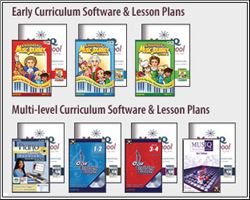
When you have a large family, music lessons can get expensive not to mention it can involve a lot of extra running around taking kids to lessons. We were recently given Adventus to review & prior to this, I hadn't heard about it but soon fell in love as you'll see why. It's a perfect, affordable fit for a large family. This is a multi-level piano program for beginners to intermediate students, ages 4-adult, containing 7 years worth of lessons. We were given the homeschool version and for my kids, we focused on levels Childrens Music Journey 1 & 2 (CMJ1 & 2).


I  myself have been playing piano since I was 10 years old. While I've been able to teach my kids how to read music and some basic music skills, I haven't had time to really get into the nitty gritty of music lessons despite owning a full size piano. But the beauty of this program is, even if you as a parent have never learned any instruments or lack music skills, you can still use this in your homeschooling!!

I'm sure your wondering how in the world does this work? The basics are you need a midi compatible keyboard that you can hook up to your computer (and if you don't own one, Adventus sells them). From there, you can decide if you'd like the full software that you can buy as a bundle or individual levels that come as a CD or if you'd prefer the monthly subscription which is only $10.95 a month for ALL your kids to take lessons. Seriously, you can't even get 30 minutes of lessons for one child for that let alone unlimited monthly access for numerous children!

Once you have your keyboard & access to whichever subscription you prefer, it's only a matter of hooking up your keyboard to your computer, which we did via USB.

All 4 of my older kids have been using this program. The program allows you to set up a profile for each child, which consists of a name & password on whichever levels you are using. Erik used CMJ1 and the 3 girls CMJ2.


When they log in, they are introduced to one of the famous composers who is their "teacher" for several lessons (then it moves on to a new composer). They listen to a short piece of their music and learn about some of the history behind the song or the composer. I love how this program incorporates many aspects of music, not just actual teaching.


From there, they go onto the lesson. As they are instructed to practice, the teacher gives them immediate feedback (which is why it's hooked up to the computer, brilliant!) If they hit a wrong key, they are told to "be careful" and they try it again. They are also given positive feedback for doing well. There is a woodpecker that acts as a metronome to help them learn to keep time. 

adventus, curriculum, music, review

The notes also light up as they play them. My kids have learned correct hand positioning from the beginning based off of middle C (and creating an "ant tunnel").


The lesson lasts about 10 minutes. From there, they can go into another area of the program to practice what they just learned by visiting "Miss Melody". Here they get the chance to spend more time reviewing what they learned in the lesson. There is also a game section, library as well as an improvisation room (where they can make & play their own music) but honestly, my kids have just loved doing the lessons & practicing that they have spent most of their time in those 2 places the most out of all 5 rooms.


I have been seriously impressed with this curriculum and how much my kids have learned in a short time. They enjoy practicing and not once have I had to remind them it's time for a lesson as the lessons are so engaging & keep their attention. They've been doing more of the lessons then I had required of them to. In fact, after practicing awhile on the keyboard, I've noticed them going over to the piano to try out there what they've learned. We plan to continue using this until they master all the levels. 

If this in any way interest you, I'd encourage you to peruse the website as there is so much info there it's impossible for me to cover it all. There are also lesson plans you can buy to go along with the lessons. These are awesome as well. They include worksheets you can print out for the students to fill in to go along with what they are learning as well as other suggestions of things to teach & review (even coloring pages for the younger students). I was able to download these to our iPad for easy reference. 

Photobucket
 photo DisclaimerGraphic1_zpsf612f371.gif

The Pilgrim Story


Dayspring Christian Academy is no doubt a familiar name to my local followers as you know this is a Christian school in our area. So imagine my surprise when I was asked to review one their online courses called The Pilgrim Story. For those not familiar with Dayspring, they take the principal approach in their teaching which means they use the Bible as their central resource to equip students to have a biblical worldview.

The Pilgrim Story is an online, self paced course that consists of 5 units with a total of 17 lessons. The website stated this course was geared for grade 3-6 but at the beginning of the intro it stated grades 2-8. All my kids worked on this together (grade 4-7). We did 2 lessons a week as they can take about 45 minutes give or take to complete. There is also a lot of information to soak up as well as additional activities you can do. I also wanted to stretch this out to finish right before we celebrate Thanksgiving.


The course is made up of a multisensory approach containing colorful slideshow presentations while being narrated at the same time. That made Erik happy he didn't have to do a lot of reading! (though at times it was a lot of writing for him). The students have to click through each slide which keeps them from tuning out the lecture. At the beginning of each lesson, there are notebook pages you can print out to put in a 3 ring binder. During the slides, there are times when the student can fill in the blanks on the worksheets. These are highlighted on the slides with a pencil and the words underlined that they need to copy. This helped keep them engaged and retain the facts. There were also interactive questions throughout the course that required the students to click an answer before moving on. At the end of each unit there was an online test they could take or you could opt to do an offline essay instead.

This is a screen shot you see at the beginning of each lesson that lists the different activities you can download to print out. I love the options each lesson have (some of the later lessons have crafts and a recipe) but I would prefer to have the ability to download the pages for printing in one location or at least at the beginning of each unit instead of each individual lesson.

Overall, we have been learning a lot of new facts about the Pilgrims and their life that we've never heard elsewhere.  This course definitely digs deep into their history, showing us how important the Bible was to the Pilgrims and all they went through in order to be able to worship freely. We've all found it enjoyable and are looking forward to the end of the course where we will take a virtual field trip to Plymouth, MA led by Mary Stauffer the creator of this course.

The Pilgrim Story is $99 and will give you access within 48 hours after purchase. It is then available for 6 months after you purchase it.
Photobucket
As a member of the TOS crew, I was provided this course at no charge to me in exchange for an honest review. All opinions are my own.

Kinderbach


Do you have a young child interested in music and learning to play piano but not sure where to start? Well, there's an app for that! Kinderbach is a piano program for ages 3-7 that offers both an online program as well as an School Version App for the iPad/iPhone. We had the privilege of reviewing the app for the iPad.

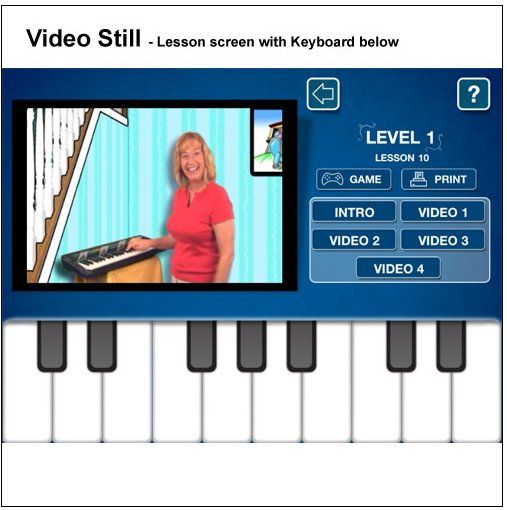
The app contains 3 levels with each level consisting of 10 lessons. In each lesson you have an introductory video, then 4 separate videos. All together, you have a years worth of music lessons. Before you click on each lesson, there is a summary of what that lesson will cover. We liked how the concepts were broken down into simple, concise lessons. The videos were short enough where my kids didn't lose interest in watching them. Karri (seen below) and her animal friends like Dodi the Donkey were very engaging and made the lessons fun.
Also from this screen, you have the ability to play the game that goes along with the lesson (there are 6 games in total for the app and each gets increasingly a bit more challenging). You also can print out any worksheets that coincide with this lesson if you have an AirPrint supported wireless printer. If you don't, you do have the option to buy the PDF files to print. Being that my kids were a bit outside of the age range, they chose not to do the printables as they felt they were geared toward the younger age crowd. But what they sometimes did instead, was take the iPad to our piano, and instead of using the onscreen keyboard, they'd follow along directly on our piano. I though that was pretty creative and gave them a realistic way to apply the lessons.

One thing I want to add about the videos, you need to be connected to wifi to download the videos the first time to watch. Once they are downloaded, you can watch them wherever. Not a huge deal if you are at home. If you plan to take this on the go, it does take a little planning ahead to make sure you have the videos downloaded that you need. My kids enjoyed the portability of this program as we recently went on vacation and they enjoyed playing the games on the plane.

All in all, we were pleased with the app. The only change I would make is a way to go back in and pick up where you last left off at. If you didn't remember or make note of your last lesson, you'd have to try to figure out what you did before.

This app is available for $26.99 with no further in app purchases needed. Remember, this is for a years worth of lessons and once you buy it, you have it forever to use with many kids. I believe I saw on their Facebook page that this coming Friday, the app will be majorly on sale! They also have a free app with the 1st game & 2 lessons you can try out.

Photobucket
As part of the TOS crew, I was provided this app at no cost to me in exchange for an honest review. All opinions are my own.

Orlando Stroller Rental

In the past, when we've traveled with little ones, we've always brought our stroller(s) along. Our first 2 trips to Disney World, back in '02 and '04, we had 2 small, old strollers we brought along instead of a double as it was easier to gate check as well as haul on & off the Disney buses.


Our 3rd trip to Disney the kids were finally old enough we were able to be stroller free. What a great feeling that was!!!

But alas, our recent trip to Disney that we just returned from a week ago (more about the trip another time), we knew we would need a stroller for our youngest who is 14 months old. I was trying to debate which of my single strollers to lug along. One that I wouldn't care if it got banged up while flying but was also comfortable enough for Olivia yet small enough to fold up compact for all the on & off trips we'd be doing on Disney transportation.

Problem was I didn't really have one that fit the description and wasn't sure what I was going to do. That is until I thought about using a rental company near Disney. During all our trips, I knew there were companies out there that rent strollers and other baby equipment but I never really paid attention to them. I saw great reviews about Orlando Stroller Rentals and decided to contact them to see if they'd be able to help me.


They returned my email promptly and answered all the questions I had. They said they would set me up with City Single Stroller. The reservation process went smoothly and they said all I had to do upon arrival at our hotel was to go to the registration building/luggage area to pick up the stroller. 

We flew down to Orlando with friends of ours who brought their double jogging stroller. I have to say it was nice not having to worry about going through security with our stroller as well as gate checking it then waiting for the airline employees to unload it once we landed. Olivia preferred to be in the sling on me during this time anyway.

Once we arrived at our hotel, the pick up place for our stroller was right where we got dropped off. It was as simple as giving my name to have them retrieve it for me. And let me tell you, I was impressed with this stroller from the very first push! I had seen online prior to our trips how this stroller works so I had an idea of all the features and how to fold it. I loved how easy it was to push with one hand but the selling point on this stroller was the larger than normal sunshade which is a needed thing when you are in the Orlando sun most of the day as well as the easy one hand fold! My older kids were even able to quickly & effortlessly fold the stroller as all you do is pull on a single strap in the seat.


 The back of the seat had a nice large pocket for storing just about anything!

This stroller had a nice large basket.


 They also offer the option of a cup holder with handy pockets.

For extra an extra fee, you can also rent a rain cover. For the time of year we go, we are used to pop up showers that happen so we wanted the rain cover. Go figure, we didn't have any of the afternoon showers we are used to. Though I bet if I didn't have the cover, it would've rained!

The seat reclined far and made a nice area for napping. 


When it was sadly time to leave Disney, all we had to do to return the stroller was to take it back to the same location where we had picked it up at. The friends we traveled with said next time they will rent a double stroller as they really liked the ease of renting from this company and the features this stroller had.

Orlando Stroller Rental doesn't just rent for those going to Disney but also any other area in Orlando that you might be visiting. Check out the different strollers they have for rent, both single & double as well as the pricing listed for the different lengths that you would need it for.

I was provided a stroller rental at no cost to myself in exchange for an honest review. All opinions expressed are my own.

Schoolhouse Teachers.com

I was recently given a subscription to Schoolhouse Teachers to try out. I didn't know much about this website except that it was a homeschooling resource. I just expected to see some print outs, some PDF files and maybe some resources. Boy was I in for treat! As I started perusing the site, I felt like a kid at Christmas as I opened up the different topics and subjects. I didn't know where to start to be honest as there is truly just so much! I saw there was 2 video site tours that I figured I should watch and I'm glad I did. They briefly explained how to use the teacher lesson plans as well as the daily studies.

The website is very organized & simple to navigate. There are 4 main areas:
-Schoolhouse Teachers
-Schoolhouse Dailies
-Schoolhouse Extras
-Schoolhouse Library

What I found fascinating about the schoolhouse teachers section is that they have some of the biggest names in online and home education teaching in a variety of subjects all laid out for you. I don't know about other busy moms but I LOVE having a lesson placed in front of me with everything I need. All I have to focus on is the actual implementing and teaching part. Not only do they have all the work done saving me time, they also are available via email if we need any additional help or support. Some of the subjects currently listed under this section are:
-Career Exploration   -Chemistry        -College Choice Guidance    
- Ecomonics              -Figures in History      -Filmaking        
-Geography              -High School Math      -History                 
-Home Ec               -Lapbooking                 -Literature
-Music                    -Reading Lessons        -Special Needs          
-Technology            -Writing

Schoolhouse Teachers.com has activities for Pre-K all the way up to high school. So there is something for everyone. One of my kids favorites has been the daily writing prompts. Every day there is a new idea for something to write about. Each of my kids has a journal that I like them to write in about whatever they want. Sometimes they are stumped about what to write so these daily writing prompts are great for their journaling. Each day they find it exciting to see what the new topic will be. For example, one from this past week was:

-We all know that summer can sizzle as the temperature rises. Write about your favorite ways to stay cool when the weather turns hot.

 The daily writing is just one example of what is under Schoolhouse Dailies. There are many other great areas covered (grammar, math, history just to name a few.) I love that there is something new to discover in this section Monday thru Friday saving me time by having it right there to use. The only thing I would change in this area would be to have the ability to look ahead a week or so to be able to plan rather than looking it up each day. A way to remedy this is to just go back a week and use the previous weeks "dailies" to be able to plan out a week at a time.  

A few other highlights worth mentioning that are included is The Old Schoolhouse magazine. Not only the monthly edition but you have access to the older issues. (If you have a smartphone, there is also a free app you can use to access this.) There are also e-books, reading lists, MP3 recordings of the schoolhouse expo just to list a few examples.

BUT that isn't all! One of the best parts that are included with your membership is access to all 5 homeschool planners.

There is the "big momma" with over 800 pages. Just a few of the things you'll find in it are calendars, field trip log, even a meal planning area as well as a wealth of articles that I found very informative. There are also planners for special learners, primary, intermediate and high school. Each planner allows you to fully customize it by either typing into the planner on your computer and saving/printing it or you can just print it out plain and hand write on it. I loved the fact that one of the layouts on the main planner has a layout for 4 kids for each day which means I don't have to have 4 separate pages each day to write in. I can condense it and just need 1 page per school day.


Not only is a schoolhouse membership invaluable, it's very affordable! Your first month membership only costs $3 (yes you read that right) and each month after that is just $12.95 a month. I would encourage you to head over to their sample pages and take a look around. Give the first month a try since it only costs $3. I have no doubt you will love it as much as I have!


Photobucket

As  a member of the Schoolhouse Review Crew, I received this product at no cost to me in exchange for my honest review. All opinions expressed are my own.

Review of Time4Learning


It's amazing how fast 30 days past! Before I knew it, our trial of Time4Learning was over. The quick summary is that all my kids enjoyed it and seemed to learn some things from it. My short version is that it seemed very engaging and easy enough to use.

I started out on everyone's grade level (3,5,6 &6). You have the ability to go up or down a grade level in the subjects so after reviewing some of the curriculum I made adjustments as needed. It was very easy for the kids to log onto the program themselves. There were a lot of different activities to choose from. I admit I was used to other programs where you do things in sequential order. With Time4Learning, you can skip all over the place. I wasn't quite a fan of this as it gave the kids the ability to just pick and choose what they want rather than focus on one thing at a time.


The activities and lessons were very engaging and kept my kids attention. Some of the Language Arts lessons seem to draw out for a few simple words. But irregardless my kids enjoyed it and that's what matters. ;) I never had to prompt them to do their lessons on this program so that was a plus! I also like the fact that everything was student paced. I'm a big fan of letting the kids work at their own pace as they retain the info much better this way.

Because the trial was only 30 days, I couldn't really form an opinion if this would work as a sole curriculum or as a supplementary source. I'd suggest trying it out yourself and deciding based on your needs. www.time4learning.com I could definitely see this covering several subjects with minimal fill-ins from other sources.

With your subscription, you get-
-Lesson plans and teaching tools for parents
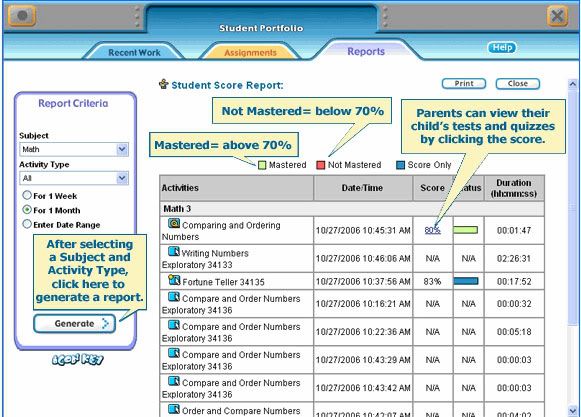
-Detailed reporting for easy record keeping
-Lessons correlated to state standards
-1,000+ student-paced multimedia activities


This was written entirely from my own opinion and not from Time4Learning. I was compensated for my review.