Money Saving Monday

Did you know you can earn money while using your smart phone?? Yup, you read that right! If you have an iPhone (which is what I have) and I believe even some droids have these same apps (though I am not experienced with those so you'll have to check it out yourself). Since I have an iPhone, that is what I will be referring to in this post. If you don't have a smart phone, I still have a few websites you can use to earn back money on things you buy as well, so keep reading.

The apps I'm sharing I personally use and have received money back on so no worries that this is anything shady I'm sharing. They are all legit.

With that said, the 1st app I want to share with you is Ibotta. 

Ibotta
 

The way this app works is you have several pages of offers available & it will tell you how much you can earn on each product. If you want to verify you have the correct product, you can scan the barcode & it will tell you yes or no. Usually you read a fact or watch a short video to earn the full amount. From there, you take a picture of the receipt that shows you purchased it, then you scan the barcode & it uploads everything for you. You'll get a confirmation within 24 hours if you correctly submitted your info then the money is deposited into your account. I make occasional withdraws to my paypal with things I've earned.

Last week, CVS had the Clear shampoo for free plus there was $1.25 available to earn back on Ibotta so I actually earned money just for picking this up. This app has a list of stores you can buy these products, most of them are chain stores like CVS, Walmart, etc. Downside is you can't use it on your small name places like a local grocery store.

**update** I just got a notice if you are new to signing up with Ibotta and use 2 offers in your first 2 weeks, you will get a $2 bonus in addition to whatever you earned!!!

Another one of my favorite apps is Endorse. Unlike Ibotta, you can use Endorse no matter where you make your purchase.

Endorse
 

The first time I used this app, I got $6 back on just 3 products!! Each Thursday, they give you new offers that you can either earn 10-100% cash back. Where it says "upgrade this offer", it just means if you click accept, it'll post about it on facebook (if you don't like that, just only allow yourself to see those posts & hide them from your friends). I plan to use that 50% back on diapers this week! Combined with coupons & sales, they will practically be free! Endorse is definitely one of my favorite deal apps lately. You can make money on it when you combine their offer with deals you find. All you have to do is upload the receipt to show you purchased it. You can then deposit your earnings into paypal.

Shopkick is a relatively new one I've been using. This has a slightly different approach where you earn points for visiting certain stores that are listed or scanning item they ask you to. You then turn those points into gift cards for places like Target, Old Navy, Starbucks, Best Buy etc. Hey, if you're already out and about, simply check your phone & see if there is a place near you to get some easy points. It doesn't take much to earn gift cards.

Shopkick

Don't have a smartphone? That's ok, you can still earn some money if you like to shop online. Ebates is a great way to earn a percentage back on your online shopping. Simply go to their page, look up the place you want to shop at & go through their link (after setting up your account so they can pay you). At Christmas time, I earned several dollars just by doing this, and get this, I got an actual check in the mail from them!! So if you are already going to shop online, check them out. I've seen offers for 3-10% cash back depending where you shop, sometimes more.

Another way to earn points to go towards gift cards is Swagbucks. There are many ways to earn swagbucks, watching videos, filling out surveys, using their search engine, etc. Just rack up the swagbucks until you get enough to get whatever gift card you'd like.

Obviously there are many ways available to use your smartphone or the internet to earn money or gift cards. These are just a few that I personally use & recommend. Are there any that you use that I didn't talk about? Drop me a comment & let me know! 

 I would love if you decide to sign up for any of these programs if you'd use my links please. Any little bit I earn off these apps, I put towards our homeschooling projects & field trips. Thanks!

Computer Science for Kids


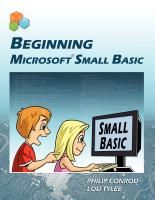
We were recently given the chance to review Beginning Microsoft Small Basic from Computer science for Kids. I know, you are thinking WHAT, computer programming??? Don't despair, this curriculum isn't as complicated as the name lets on. In fact, you don't even need to have any previous computer programming experience. You just need to be familiar with operating Windows which is pretty much second nature for most people.

Microsoft Small Basic Programming

Beginning Microsoft Small Basic is a programming tutorial that has 11 lessons, each lesson taking about 3-6 hours each, though this varies greatly on who is using it. It's recommended age is for those 10 & older. This curriculum also comes with over 500 pages of notes and programming examples for the student to follow and use. The chapters cover things like computer history, elements of the Small Basic language, program design, debugging, Small Basic graphics just to name a few (check out the full table of contents for even more info). There are also several computer programs that use fun games to show the student in real time what they've learned. 

State Capitals Game

My husband is the IT Admin where he works and was intrigued by this course so he was the "main" student for this review while working alongside our son. This program came as a zip file containing both the forms of PDF & Word document with all the chapters for the curriculum. One of the biggest things he was impressed with was the ease of use. He said everything was clearly laid out and not once did he ever become confused on what he was to do. There were screen shots also included. Hubby said it was just a matter of reading the directions (which he opened in a separate window from where he was working), typing in the coding from the lesson then hitting run. If anything was entered incorrectly, it would tell you which line had an error making it easy to find & correct.

He felt this was a good curriculum as an introduction for those wanting to learn about Small Basic though we both felt the younger age kids (10-12) would have difficulty doing this on their own and would benefit from having a parent work alongside of them.

This program is currently on sale until 7/4, as an instant download, for $34.95. Normal price is $59.95. They also offer a Computer Bible Games for Microsoft Small Basic that some of the crew reviewed & enjoyed as well.

Photobucket

The Ultimate Blog Party #UBP13

Photobucket

If you are stopping by Treasuring Life's Blessings for the first time, welcome!!! This is my 2nd year of participating in the Ultimate Blog Party and it's always fun to discover new blogs to read and make some new friends as well.

My name is Jenn and next month will mark 3 years since I started my blog sharing about my journey with our son Noah. He is one of my soon-to-be 7 children (#7 due next month).


 I am blessed to be able to homeschool my kids so you will find me sharing antics about our daily life as well as curriculum reviews. I also host giveaways from time to time as well!

I have a passion for cooking & love being able to talk about new recipes I try with others. Of course, having a large family also means I get creative in finding ways to save money and I share those tips occasionally on Money Saving Mondays. And that's just the tip of the iceberg, you'll find me sharing about many other things here as well!

Overall, I try to live out my blog name & am learning to truly Treasure Life's Blessings, both big & small, good & not so good. After all, each moment of our life has a purpose and I enjoy sharing a glimpse of that with you! So get comfy, make a cup of tea and feel free to browse around my little neck of cyberspace.  Leave me a comment & let me know where you are visiting from so I can say hi as well! Thanks for stopping by!

You can also connect with me at:

"Whatever you do, work at it with all your heart, as working for the Lord, not for human masters, since you know that you will receive an inheritance from the Lord as a reward. It is the Lord Christ you are serving. "
Colossian 3:23-24

Sufficient Grace Ministries Auction!!!!

If you've been a somewhat regular read here at TLB, you have seen me talk about Sufficient Grace Ministries. This is a wonderful organization that provides support for families who have lost a baby. I wish I had known about them before or right around the time Noah died. It was several months until I came across them but what a blessing they've been to me since then.

Most recently, I participated in their Walking With You series. It's always so welcoming to be able to openly share my grief journey with many others who understand.

All that to say they are only able to provide the support they do with donations & fundraisers. Right now, they have an AWESOME auction going on on Facebook with well over 300 items up for bids. Many items are things for anyone, not just baby loss families. It ends tomorrow (Friday) at 11:45pm EST. So please go check them out, treat yourself to a gift and help support a wonderful organization!

Here's just a few pics of things up for auction:


(Joyce Meyer gift basket)

And SO MUCH MORE! Go win something in memory of Noah!!! <3

Happy Easter

I am so thankful for the hope we have in Jesus for many reasons. If he hadn't died on the cross for our sins, I wouldn't be able to see my precious son Noah again.


Holidays are bittersweet and the hole in our family from missing Noah is so prevalent. As I watch my other children, I can only imagine how much excitement our 2 1/2 year old would've added to the mix this year. . . his laughter, his smiles, his hugs. Oh my sweet boy, the tears still come as my arms ache for you! I wonder what the celebration in Heaven was like today. How amazing you are apart of it! I love & miss you more than words could express!!!

Apple Snickerdoodle Cobbler

I don't know about you but my girls and I love Pinterest and all the ideas we come across. I also like Pinterest for organizing things I come across myself as I surf the net so I can be sure to find them again when I need them. Believe it or not, I've actually made a lot of the recipes I pin. What can I say, I am a recipe junkie & love it!!

A few days ago, Sarah wanted to make one of the recipes we've seen floating around. She's actually made it before but this time we were able to snap some pictures as she wanted to post this & share it with you. Without ado, here's Sarah!

Today i'm going to tell you guys about an awesome dessert,that my family & I love.It's a very simple dessert to make and also tasty. I enjoy to cook & bake anything, you name it.


I made a double batch as it doesn't last around here for long. I cored, peeled then sliced up apples into thin pieces.


In the picture above of me, I am mixing up the dough for the snickerdoodles. I rolled them into big balls so they would spread all over then rolled them in cinnamon sugar.

apple snickerdoodle cobbler, recipe, dessert

 This is what it looked like after it came out of the oven, it smelled SO good! It's hard to tell in this picture but the cookie topping is so very soft. This would taste good with homemade vanilla ice cream but we didn't have everything on hand to make it.

Thanks everyone for reading & let my mom or I know if you try this out!!

Apple Snickerdoodle Cobbler

Cookie Ingredients:
1/2 tsp cream of tartar
1/8 tsp of salt
1/2 tsp baking powder
2/3 c of flour
1/4 c of unsalted butter, softened
1/3 c of sugar, plus 1/2 cup
1 egg
3/4 tsp cinnamon

Apple Ingredients:
8 c of apples (about 6-8 or so)
1/4c brown sugar
1/2 tsp cinnamon

Preheat oven to 350. In a small bowl, combine the 1st 4 dry ingredients for the cookies.In a separate bowl, cream butter, sugar then add the egg. Combine with dry ingredients & mix well. 

In a small bowl, combine the 1/2c sugar & 3/4 tsp cinnamon.

Core, peel & slice the apples. Put them in an 8x8 dish and mix well with the 1/4c brown sugar & 1/2tsp cinnamon.

Form 1" balls of cookie dough, then roll in the cinn/sugar mix. Place the coated balls on top of apples. Bake for 40-50 minutes until apples are tender & the cookies are lightly golden.

*the above pictures show a double batch of this recipe in a 9x13 pan.

Adventus- Piano Program Review


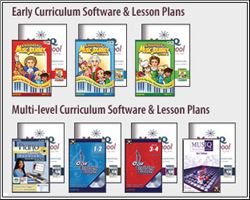
When you have a large family, music lessons can get expensive not to mention it can involve a lot of extra running around taking kids to lessons. We were recently given Adventus to review & prior to this, I hadn't heard about it but soon fell in love as you'll see why. It's a perfect, affordable fit for a large family. This is a multi-level piano program for beginners to intermediate students, ages 4-adult, containing 7 years worth of lessons. We were given the homeschool version and for my kids, we focused on levels Childrens Music Journey 1 & 2 (CMJ1 & 2).


I  myself have been playing piano since I was 10 years old. While I've been able to teach my kids how to read music and some basic music skills, I haven't had time to really get into the nitty gritty of music lessons despite owning a full size piano. But the beauty of this program is, even if you as a parent have never learned any instruments or lack music skills, you can still use this in your homeschooling!!

I'm sure your wondering how in the world does this work? The basics are you need a midi compatible keyboard that you can hook up to your computer (and if you don't own one, Adventus sells them). From there, you can decide if you'd like the full software that you can buy as a bundle or individual levels that come as a CD or if you'd prefer the monthly subscription which is only $10.95 a month for ALL your kids to take lessons. Seriously, you can't even get 30 minutes of lessons for one child for that let alone unlimited monthly access for numerous children!

Once you have your keyboard & access to whichever subscription you prefer, it's only a matter of hooking up your keyboard to your computer, which we did via USB.

All 4 of my older kids have been using this program. The program allows you to set up a profile for each child, which consists of a name & password on whichever levels you are using. Erik used CMJ1 and the 3 girls CMJ2.


When they log in, they are introduced to one of the famous composers who is their "teacher" for several lessons (then it moves on to a new composer). They listen to a short piece of their music and learn about some of the history behind the song or the composer. I love how this program incorporates many aspects of music, not just actual teaching.


From there, they go onto the lesson. As they are instructed to practice, the teacher gives them immediate feedback (which is why it's hooked up to the computer, brilliant!) If they hit a wrong key, they are told to "be careful" and they try it again. They are also given positive feedback for doing well. There is a woodpecker that acts as a metronome to help them learn to keep time. 

adventus, curriculum, music, review

The notes also light up as they play them. My kids have learned correct hand positioning from the beginning based off of middle C (and creating an "ant tunnel").


The lesson lasts about 10 minutes. From there, they can go into another area of the program to practice what they just learned by visiting "Miss Melody". Here they get the chance to spend more time reviewing what they learned in the lesson. There is also a game section, library as well as an improvisation room (where they can make & play their own music) but honestly, my kids have just loved doing the lessons & practicing that they have spent most of their time in those 2 places the most out of all 5 rooms.


I have been seriously impressed with this curriculum and how much my kids have learned in a short time. They enjoy practicing and not once have I had to remind them it's time for a lesson as the lessons are so engaging & keep their attention. They've been doing more of the lessons then I had required of them to. In fact, after practicing awhile on the keyboard, I've noticed them going over to the piano to try out there what they've learned. We plan to continue using this until they master all the levels. 

If this in any way interest you, I'd encourage you to peruse the website as there is so much info there it's impossible for me to cover it all. There are also lesson plans you can buy to go along with the lessons. These are awesome as well. They include worksheets you can print out for the students to fill in to go along with what they are learning as well as other suggestions of things to teach & review (even coloring pages for the younger students). I was able to download these to our iPad for easy reference. 

Photobucket
 photo DisclaimerGraphic1_zpsf612f371.gif

Take a peek in our window


In our pjs, on the floor, on the couch, in a store.....we don't always use our books, oh how different each day looks!

Did I catch your attention?? Ha! I think I've had a bit too much of Dr Suess invading life lately, hence my goofy intro. You are probably scratching your head wondering what in the world is this post about? Today I am participating in a blog hop entitled "Show us your homeschool day in pictures".

As I sat down to brainstorm, I realized each day here in our house looks different. We don't have a set schedule for each day. Meaning, I don't say ok, at 8:30 we are going to do xyz for 30 minutes, at 10, we'll do this, etc. I like to allow as much time as each subject may take (or not take in some cases) as well as allowing for delight-directed learning. But we do have certain subjects that get covered every day and some that are a couple times a week. Outside of that, we are constantly learning no matter what we are doing.


 Mondays we are at our homeschool co-op for the full day so that really is our only day that is consistent. From there, the rest of our week could be super busy with appointments, swim & gym class at the rec, get togethers or pretty quiet and just hanging around home. We alter our schooling around what is going on each week. I print out a homework schedule for the kids of the work that needs accomplished that week and from there, they are good about spreading it out over the week once they know how busy or slow our schedule outside of the house is.


For the sake of this post, we'll just say this is sort of what a day at home with no outside plans looks like.


I have 2 kiddos that are early risers, we are talking between 6-6:45 at the latest. They get up and do their math lesson on the computer before even eating breakfast. All 4 kids do math on the computer and have to share 2 laptops so they like getting their math done & out of the way so they don't have to share a computer later on.

Once the others are awake, they do their math then as well.  Since the math curriculum we use allows them to do this on their own, it gives me time to get Olivia fed, tidy up around the house, etc.


From there, they look at their schedule of what needs done and they dive in. This could mean I go from the living room to the kitchen to the school room (since everyone often spreads out to different areas) answering questions about science, english, or music in the course of a few minutes.

Often times though, the older girls work pretty independently so I don't have to help them as much.


Of course, once in awhile I'll hear a "moooom" only to find one of our cats trying to lend a paw! Ha our animals like to get involved with school at times too. (we have 3 cats & a dog, all great animals & good with the kids).


To change things up, they like to check out the history channel as there are some pretty neat shows & documentaries on there. Though in the above picture, they are catching up on "The Bible" series.


Of course, Olivia isn't exempt from doing some learning activities geared for her age. I have a curriculum I loosely follow with her that gives me some neat teaching ideas for her. Wish I had had it when my others were little. 


She loves doing "school" like her siblings and often wants to be included in what they are doing. Sometimes this is cute and works out great like when sitting down with Hannah to do Spanish, she's picked up on a few words already, and sometimes she falls asleep. Other times, her wanting to imitate her siblings isn't such a great idea. . .


. . . like when she gets a hold of sisters math book & starts doodling her own answers! The older ones have learned if they leave pencils or books laying around, there is no telling what they might find after she does her thing!


My girls enjoy cooking, so sometimes knowing they get to tear up my kitchen is the motivation they need to get all the other stuff done. It's great the things they can learn while being in the kitchen. In the above picture, Sarah had to double the recipe which meant adding fractions together.


The kids are also big into games. We have a large game closet for this very reason. Once the weather warms up though, they usually don't play games as much as they do in winter time (you can often find some or all of them outside doing their school work when it's warmer). It's easy to turn many games into learning. Clue has been a favorite lately for working on critical thinking skills.

Granted, I didn't get pictures of everything we do in a days time but this gives just a sampling of what you might find if you were to drop by unexpectedly during the day. The kids said they wanted to get pictures of me teaching them, HA, I said my readers would rather see their adorable faces! *wink*


A Day in Our Homeschool

The Cat Wrestler

Ever since Olivia could sit up, she began interacting with our animals. We have an AKC golden retriever and 3 cats (yes, they are all indoors). Olivia was about 6 months old when we adopted 2 of our cats as kittens from the humane league.


Anytime she would pet the animals, we always showed her how to be gentle and would remind her to give them "aye-aye". Of course, not long after, she started pointing to all the pets & petting them as she said "aye-aye".


Our one kitty, Domino, really took to Olivia, though all the animals are great with her. He has been her special buddy from early on.


In fact, she started not just cuddling with him but full on wrestling him!


And the crazy thing is he LIKES it and will seek her out, nudging her so she'll tackle him!


Domino could be walking around and she'll go running and pounce on him while he just lays there letting her climb all over. In fact, if these pictures had sound, you would hear him purring loudly in each of these as she sits on him. 


He really loves her and lets her do anything to him. He is definitely not your typical cat and truly one of a special kind whom we all adore.....


......And she loves her sweet "aye-aye" wrestling buddy!!!!